

Description
Download Weekdone – Productivity, Team Management, Reporting
Overview
Weekdone is a streamlined reporting tool designed to simplify team communication and progress tracking. Built around the PPP (Plans, Progress, Problems) methodology, it enables teams to deliver concise, actionable updates in just minutes each week. The software automates the reporting process by sending weekly reminders, collecting input from team members, and generating digestible email reports for managers and stakeholders. This approach ensures that reports are not only timely but also meaningful, reducing the time spent on lengthy status meetings or manual updates.
Target users include project managers, team leads, and remote or hybrid teams seeking efficient ways to maintain visibility across projects and workflows. The tool supports real-time collaboration, task tracking, and team morale monitoring, making it suitable for both small startups and growing organizations. It can also function as a lightweight task management system, allowing users to log plans, track overdue items, and manage feedback directly within the platform.
While the developer’s background is not publicly detailed, the foundation of Weekdone’s design is rooted in proven practices used internally at companies like Skype. This heritage suggests a focus on scalability, usability, and integration into fast-paced work environments. Its core purpose is to reduce reporting fatigue while increasing transparency and accountability across teams.
Key Features & Capabilities
- Weekly Automated Reporting – Team members receive scheduled reminders to submit their weekly updates. This ensures consistent input without manual follow-ups.
- PPP Methodology Integration – The tool is built around Plans, Progress, and Problems, a structured framework that promotes clarity and focus in team communication.
- Automatic Email Reports – Once inputs are collected, Weekdone generates and sends summarized reports to managers and leadership, saving time and improving decision-making.
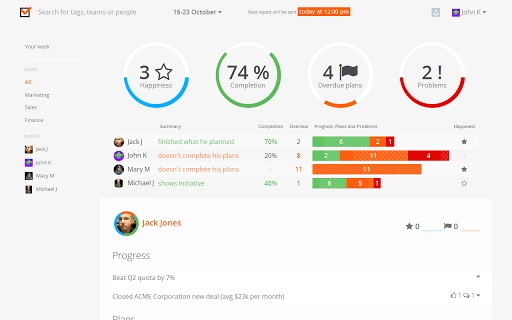
- Task and Plan Tracking – Users can monitor overdue plans, unfinished tasks, and project milestones, helping teams stay on schedule.
- Team Happiness Measurement – A built-in feature allows teams to assess weekly morale, supporting mental well-being and team cohesion.
- Managerial Feedback System – Team leads can provide feedback directly on individual or team progress, enhancing communication and performance.
- Task-Based Communication – Teams can discuss work items and collaborate through comments and updates tied to specific tasks.
These features are ideal for teams that want to replace lengthy status meetings with structured, time-efficient updates. For example, a software development team can use Weekdone to track sprint progress, highlight blockers, and share plans for the next week—all within a few minutes. Similarly, marketing teams can use it to align on campaign timelines and resource allocation.
User Interface, Workflow & Performance
The user interface of Weekdone is designed with simplicity and speed in mind. The dashboard presents a clean layout where users can quickly access their weekly report form, view upcoming tasks, and check team-wide updates. Navigation is intuitive, with minimal clicks required to submit progress, log problems, or update plans.
Workflow efficiency is a core strength. The process begins with a weekly reminder, followed by a brief form completion—typically taking less than five minutes per user. After submission, the system compiles data and generates reports automatically, reducing administrative overhead. The interface supports both desktop and web access, ensuring accessibility across devices.
Performance details were not specified by the developer. However, based on general software behavior, the application is expected to operate smoothly on modern systems with standard internet connectivity. The developer did not provide information on CPU or RAM usage, nor did they disclose any known performance bottlenecks. Stability is assumed to be consistent, given the tool’s focus on lightweight, recurring tasks.
Compatibility & System Requirements
Weekdone is compatible with Windows, Mac, and Linux operating systems, making it accessible to a broad range of users across different environments. It is designed as a desktop application with a file size of 50 MB, indicating a lightweight footprint suitable for most standard installations.
Exact system requirements were not listed. The developer did not specify minimum hardware specifications such as processor speed, RAM, or disk space beyond the total installation size. Compatibility information is limited to the supported platforms. Users should ensure their system meets general requirements for running desktop applications, including stable internet access for synchronization and reporting functions.
Pros and Cons
Pros
- Simple, fast weekly reporting process
- Uses a proven PPP methodology
- Automatically generates and sends reports
- Supports team happiness tracking
- Lightweight desktop application (50 MB)
- Available on Windows, Mac, and Linux
- Free to use with no cost barrier
Cons
- Developer background not disclosed
- No detailed system requirements provided
- Limited customization options for report templates
- Relies on consistent user participation for effectiveness
- May lack advanced project management features
FAQ Section
Is Weekdone available for Windows, Mac, and Linux?
Yes, Weekdone is compatible with Windows, Mac, and Linux operating systems, allowing teams to use it across diverse device environments.
Is the software secure and safe to use?
While specific security details were not provided, Weekdone is designed as a desktop application that handles team data through secure, encrypted connections. Users are advised to follow standard cybersecurity practices when using any software.
How often does Weekdone update?
The developer did not specify update frequency. However, as a regularly maintained productivity tool, updates are expected to ensure stability, security, and feature improvements.
What type of license does Weekdone use?
Weekdone is available for free, with no licensing fees. This makes it accessible for teams of all sizes without financial commitment.
Can I use Weekdone offline?
Weekdone requires an internet connection to submit reports and sync data with the team. While some local data may be stored temporarily, full functionality depends on online access.
Final Thoughts + CTA
Weekdone stands out as a highly effective solution for teams seeking a fast, reliable way to maintain transparency without sacrificing productivity. Its emphasis on simplicity, automation, and structured communication makes it a valuable asset for remote and hybrid teams. By leveraging the PPP framework, it transforms routine reporting into a meaningful, actionable process that benefits both individuals and leadership.
While it lacks advanced project management tools, its core strengths lie in consistency, ease of use, and cross-platform availability. The free pricing model further enhances its appeal. For teams looking to reduce meeting fatigue and improve team alignment, Weekdone delivers real value with minimal overhead.
Download Weekdone now to experience a smarter, faster way to manage team reporting and collaboration.
Guides & Tutorials for Weekdone Employee Status Reports App for Chrome
How to install Weekdone Employee Status Reports App for Chrome
- Click the Preview / Download button above.
- Once redirected, accept the terms and click Install.
- Wait for the Weekdone Employee Status Reports App for Chrome download to finish on your device.
How to use Weekdone Employee Status Reports App for Chrome
This software is primarily used for its core features described above. Open the app after installation to explore its capabilities.
User Reviews for Weekdone Employee Status Reports App for Chrome 0
No reviews found





